Microsoft does not take cryptocurrency. So if your money is in Bitcoin or USDT and you want Game Pass, the route is a prepaid code: buy the code with crypto, redeem it on your Xbox account, and the subscription starts.
The buying part is easy. The two things that actually go wrong are picking the wrong region and confusing two different products that look almost identical on a shop page. This guide covers both, then the redemption itself.
Game Pass card or Xbox gift card? They are not the same
This trips up more people than the region does, because both sit next to each other and both say "Xbox".
Xbox Game Pass Ultimate is a subscription code. Redeeming it adds a fixed block of time — one month, three months — to your Game Pass. It buys time, not balance.
Xbox gift card is store credit. Redeeming it puts money in your Microsoft account, which you can spend on games, DLC, or on Game Pass if you want to.
The practical difference: a Game Pass code is the cheaper way to get Game Pass, and a gift card is the flexible way to get anything. If you only want the subscription, the subscription code is the one to buy. If you are not sure yet, buy credit.
One consequence worth knowing before you commit: a Game Pass code is consumed the moment it is redeemed and the clock starts immediately, whether or not you play that month. Store credit sits in the account until you spend it.
Which region: USA or Europe
Microsoft prices Game Pass per market, and the gap is real money. Today, on this shop:
| Region | 1 month | 3 months |
|---|---|---|
| USA | $29.07 | $87.21 |
| Europe | $35.31 | $105.93 |
The US code is about 18% cheaper for the same subscription. On three months that is roughly eighteen dollars.
So buy the US one? Only if your Microsoft account is a US account. This is the part the price comparison sites leave out.
The rule, stated plainly
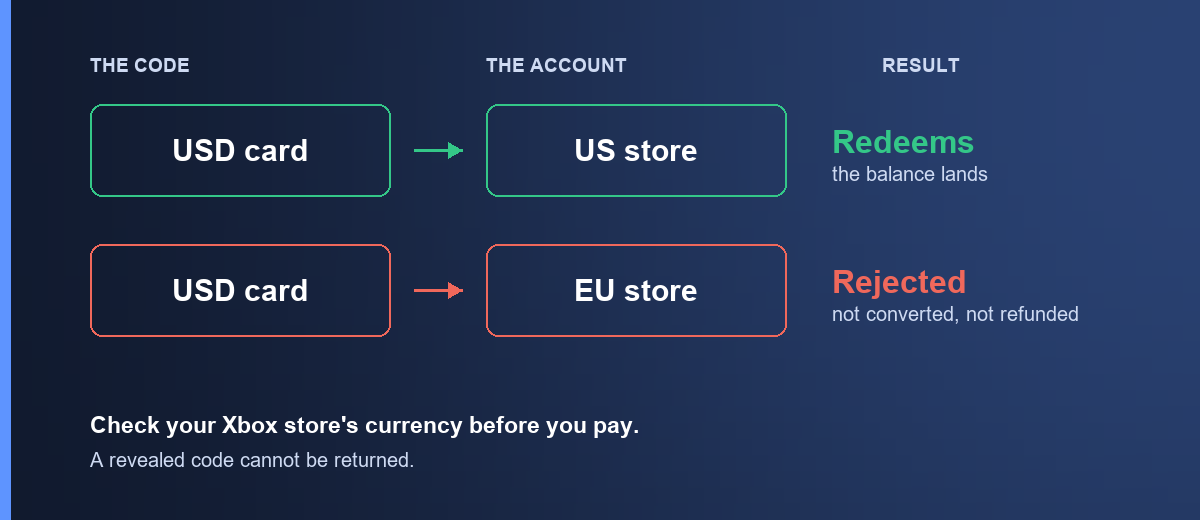
A Game Pass code is issued for one market. It redeems on an account whose region matches. Give a US code to a European account and Microsoft refuses it — the message is usually some version of "this code is not valid in your region". It is not converted to your currency, it is not partially credited, and it is not refunded by us, because nothing failed on our side: the code is intact and unused, and it still belongs to the person who bought it.
That last point is why this section exists and why it is this blunt. A rejected code is not a broken code. It is a code for a shop you are not standing in.
How to check, before you pay
- Sign in at account.microsoft.com.
- Open Your info, then look at the country or region on the account.
- Buy the code for that region.
Or, faster: open the Microsoft Store on your console or PC and look at the currency symbol on any price. Dollars means a US account. Euros means a European one.
About buying a cheaper region on purpose
You will find guides explaining that Game Pass costs a fraction as much in Türkiye or Argentina, and that switching your account region unlocks that price. It is true that the prices differ — that is why we stock a Turkish Xbox card at all, and it is genuinely useful if your account is already Turkish.
But be clear-eyed about what region-switching involves. Microsoft's terms expect your account region to be where you actually live, changing it can strand any balance already in the account, and accounts have been restricted for doing it repeatedly. We are not going to tell you it is risk-free, because it is not, and you would be finding that out after the crypto had left your wallet.
If your account is already set to a region, buy for that region. That is the advice that never costs anyone anything.
Buying it with crypto
- Open Xbox Game Pass Ultimate USA or Europe — or the Xbox gift card if you want credit instead.
- Pick the duration or amount.
- Sign in, confirm the order, and send the payment from your wallet. How paying works walks through the payment page in full.
The quote holds for a short window and the network you send on is final. Sending USDT on a chain other than the one shown puts the funds beyond anyone's reach — match the network on the payment page exactly. Stablecoins keep the price still while you send.
Once the transaction confirms on-chain, the code appears in My orders and a copy goes to your email. That is normally a few minutes.
How to redeem an Xbox code
On a console: press the Xbox button, go to Store, then Use a code — or say it to the search box. Enter the 25-character code.
On a PC: open the Xbox app or microsoft.com/redeem, sign in, and enter the code.
In a browser: go to microsoft.com/redeem directly. This is the one to use if the console is being awkward, and it gives the clearest error messages of the three.
Copy and paste rather than typing. Xbox codes are 25 characters and include characters that are easy to confuse by eye.
When the code is refused
Most rejections are one of four things, and the message usually tells you which.
"Not valid in your region" — the code's market does not match your account's. Check the region as above. The code is still good; it is good somewhere else.
"Already redeemed" — the code has been used. If you have not used it, tell us with your order number and we will check it against our supplier record.
"Invalid code" — almost always a typo. Paste it instead of typing it. If you did paste it, check you did not catch a trailing space.
Nothing happens / an unspecified error — try the browser at microsoft.com/redeem rather than the console. Consoles cache sign-in state and swallow errors; the web page tells you what actually went wrong.
If none of those fit, email [email protected] with your order number and the exact message Microsoft showed you. The exact wording is what tells us whether it is a region problem, a supplier problem or something else — a paraphrase costs a round trip.
Frequently asked questions
Does Xbox accept Bitcoin directly?
No. Microsoft accepted Bitcoin for Xbox store credit for a period and stopped. Buying a prepaid code with crypto is the current route.
Can I stack Game Pass codes?
Yes. Redeeming several adds their time together, up to Microsoft's limit on how far ahead a subscription can be prepaid. If you are already subscribed and paying monthly, a redeemed code is applied first and the recurring charge resumes when it runs out.
Will a US code work on a European account?
No. Region has to match. See above — this is the single most common reason a code is refused.
Which cryptocurrencies can I pay with?
Bitcoin, Ethereum, USDT, USDC, BNB and TRON. Stablecoins are the easier choice since the quoted price does not drift while you are sending the payment.
How fast does the code arrive?
Usually within a few minutes of the transaction confirming on-chain. Confirmation time depends on the network and the fee you paid, not on us. The code appears in My orders and in your email.
Is a Game Pass code the same as Xbox Live Gold?
Game Pass Ultimate includes what used to be sold as Xbox Live Gold, now called Xbox Network. A separate Gold code is a different product and does not add Game Pass.
What if my code does not work?
Email [email protected] with your order number and the exact error. If the code is confirmed faulty and has not been redeemed, we replace or refund it. See the refund policy for the full detail.
Ready? Game Pass Ultimate USA, Europe, or an Xbox gift card if you would rather have credit.