Nintendo does not accept cryptocurrency. If your money is in Bitcoin or USDT and you want Switch games, the route is an eShop card: buy it with crypto, redeem the code, and the funds land in your Nintendo Account balance.
Every platform in this shop has a region rule. Nintendo's is the one worth reading twice, because it is the hardest to reverse.
Why Nintendo's region lock is different
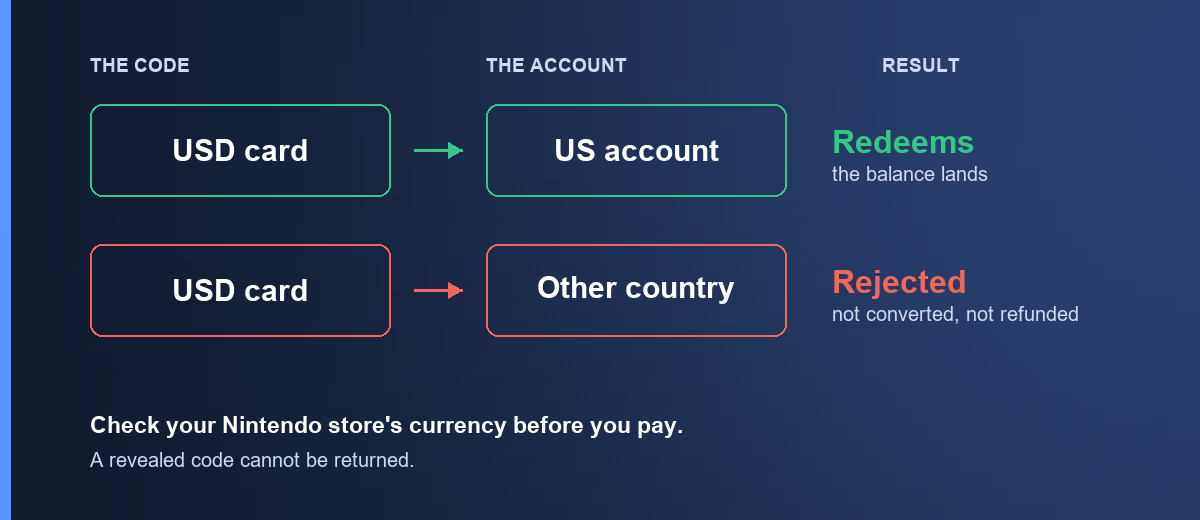
A US eShop card redeems on a Nintendo Account whose country is the United States. Anywhere else and it is refused — not converted, not partially credited, and not refunded by us, because nothing failed on our side and the code is intact and unused.
So far, same as everywhere. Here is what is different.
On Steam you can, with effort, get support to move a store region. On Google Play you can change country once a year. On Nintendo, once your account holds a balance or has made a purchase, the country is effectively fixed. Nintendo's own guidance is that you cannot change it while you have funds or an active subscription, and any balance does not survive a change even where one is possible.
The practical result: buying the wrong region card is not a delay, it is a dead end. The code stays good — but good for a shop you cannot get into.
Check first — it takes ten seconds
- Go to accounts.nintendo.com and sign in.
- Open Profile.
- Look at Country/region of residence.
Or on the console: open the eShop and look at the currency symbol on any price. Dollars means a US account.
Buy the card that matches. If your account is not US, a US card is not the right purchase.
What eShop funds cover
They do cover: digital games and DLC from the eShop, and Nintendo Switch Online memberships.
They do not cover: physical games, Nintendo hardware, or anything bought outside the eShop.
One useful Nintendo-specific detail: funds are shared across a family group in most markets, so a balance added to the parent account can be spent by the child accounts linked to it. If you are buying for a family, add it once at the top rather than to each account.
Amounts here run from about $10.92 to $54.57.
Buying it with crypto
- Open Nintendo eShop US.
- Pick the amount.
- Sign in, confirm the order, and send the payment from your wallet. How paying works walks through the payment page in full.
The quote holds for a short window and the network you send on is final. Sending USDT on a chain other than the one shown puts the funds beyond anyone's reach — match the network on the payment page exactly. Stablecoins keep the price still while you send.
Once the transaction confirms on-chain, the code appears in My orders and a copy goes to your email. That is normally a few minutes.
How to redeem an eShop code
On a Switch: open the eShop from the home menu, select your user, choose Redeem Code from the left menu, and enter the 16-character code.
On the web: sign in at accounts.nintendo.com, open Shop Menu, then Redeem code.
The console route is the one most people use, but the web page gives clearer errors when something is refused.
Copy and paste rather than typing. eShop codes use a character set that is easy to misread.
When the code is refused
"This code cannot be used in your country" — the card's market does not match your account's. Check as above.
"This code has already been used" — it has been redeemed. If you have not redeemed it, send us your order number and we will check it against our supplier record.
"The code is not valid" — almost always a typo. Paste rather than type, and check for a trailing space.
If none of those fit, email [email protected] with your order number and the exact message Nintendo showed. The exact wording is what separates a country problem from a supplier problem.
Frequently asked questions
Does Nintendo accept Bitcoin directly?
No. Buying an eShop card with crypto is the route.
Can I change my Nintendo Account country to match a card?
Not once the account holds funds or has an active subscription — and where a change is possible, the existing balance does not survive it. Treat the account's country as fixed and buy for it.
Can I buy Nintendo Switch Online with eShop funds?
Yes, in most markets. Physical goods and hardware are not covered.
Can my family use the balance?
In most markets, yes — funds added to an account can be spent by others in the same family group. Add it once rather than per child account.
Does the balance expire?
Funds do not expire once added in most markets. Check the product page for anything specific to the card itself.
Which cryptocurrencies can I pay with?
Bitcoin, Ethereum, USDT, USDC, BNB and TRON. Stablecoins are the easier choice since the quoted price does not drift while you are sending the payment.
What if my code does not work?
Email [email protected] with your order number and the exact error. If the code is confirmed faulty and has not been redeemed, we replace or refund it. See the refund policy for the full detail.
Ready? Nintendo eShop cards are here, or browse the rest of the gaming category.