Most gift cards buy one thing. Razer Gold buys hundreds.
That is the whole point of it, and it is why it is worth understanding properly: Razer Gold is not a card for a particular game, it is a payment method that a very large number of games and platforms accept at checkout. Top it up once and you can spend it across all of them.
If you hold crypto and play more than one game, this is usually the most useful single thing on this shop.
What Razer Gold actually is
Think of it as a wallet rather than a voucher. You redeem a PIN, the value lands in your Razer Gold balance, and from then on "Razer Gold" appears as a payment option inside the games and stores that support it — the way a card would.
What it typically covers: mobile game top-ups, PC game currencies, several regional storefronts, and a long list of publishers. Coverage changes as Razer signs and drops partners, so check that your specific game accepts it before you buy rather than after. Razer publishes the current catalogue on their own site, and that is the authority — not us, and not any list that has been sitting on a blog for two years.
Gold and Silver are not the same thing
This confuses people constantly, so it is worth two sentences.
Razer Gold is the spendable balance. It is what you buy, and what games accept.
Razer Silver is a loyalty points programme. You earn it by spending Gold, and you redeem it for rewards. You cannot buy Silver, and Silver does not pay for games.
If someone offers to sell you Silver, that is not a thing.
Why the region decides everything
Razer Gold is issued per market, and this is the single most common way a purchase goes wrong.
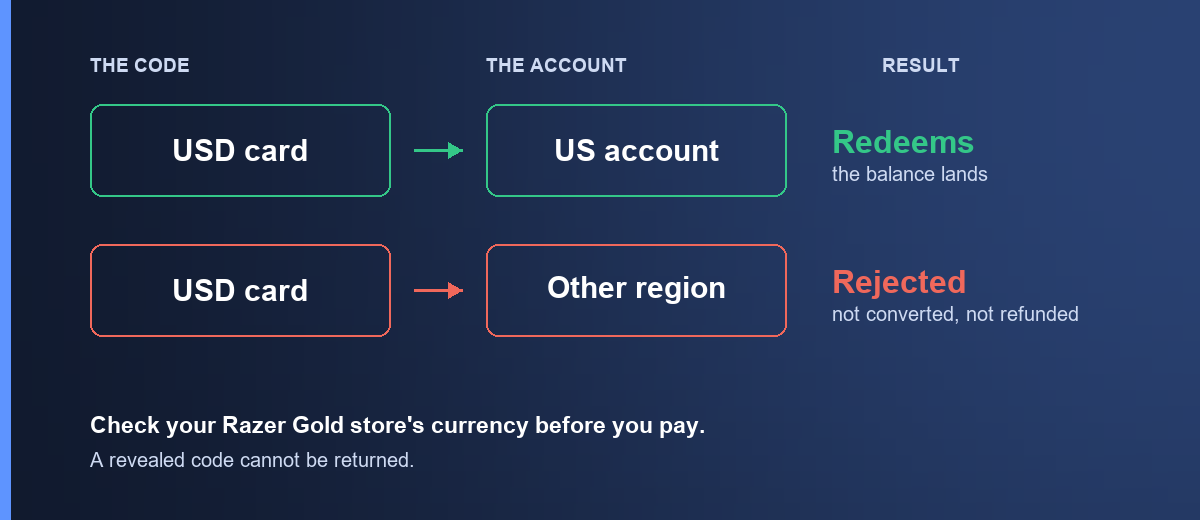
A PIN issued for one region redeems on a Razer Gold account registered to that region. Give it to an account in another country and it is refused. It is not converted at some exchange rate, it is not partially credited, and it is not refunded by us — nothing failed on our side and the PIN is intact and unused.
There is a second layer here that catches people who got the first part right: your Razer Gold region also has to match the game's region. A balance in one market may not pay for a top-up in another, even though both are Razer Gold. If you are topping up a specific game, check which region that game bills you in.
How to check, before you pay
Sign in at gold.razer.com and look at the country on your account, and at the currency your balance is shown in. Buy the PIN that matches.
Buying it with crypto
Denominations here run from about $0.96 to $479.40, which is one of the widest ranges in the shop — small enough for a single mobile top-up, large enough to fund a year.
- Open Razer Gold.
- Pick the amount.
- Sign in, confirm the order, and send the payment from your wallet. How paying works walks through the payment page in full.
The quote holds for a short window and the network you send on is final. Sending USDT on a chain other than the one shown puts the funds beyond anyone's reach — match the network on the payment page exactly. Stablecoins keep the price still while you send.
Once the transaction confirms on-chain, the PIN appears in My orders and a copy goes to your email. That is normally a few minutes.
How to redeem a Razer Gold PIN
- Sign in at gold.razer.com on the account you want the balance on.
- Open Reload and choose Razer Gold PIN as the method.
- Enter the PIN and confirm.
- The balance appears in your Razer Gold wallet.
Copy and paste rather than typing. Razer PINs are long and mix characters that are easy to confuse by eye.
Then, in the game or store you want to spend it in, select Razer Gold at checkout and sign in when prompted.
When the PIN is refused
"Invalid PIN" — usually a typo. Paste rather than type, and check for a trailing space.
"Already used" — the PIN has been redeemed. If you have not redeemed it, send us your order number and we will check it against our supplier record.
Refused with no clear reason — this is almost always the region. Check your account's country and currency before assuming the PIN is faulty.
It redeemed but the game will not take it — that is the second-layer region problem above. The balance is fine; it is in the wrong market for that particular game.
If none of those fit, email [email protected] with your order number and the exact message Razer showed you. The exact wording is what separates a region problem from a supplier problem.
Frequently asked questions
Does Razer accept Bitcoin directly?
Not for Razer Gold top-ups in most markets. Buying a PIN with crypto is the reliable route.
Which games accept Razer Gold?
Hundreds, and the list moves. Check Razer's own catalogue for your specific game before buying — that is the only list that is current.
Can I withdraw Razer Gold back to money?
No. It is a spending balance, not a wallet you can cash out. Buy what you intend to spend.
Does Razer Gold expire?
Balances can go dormant after long periods of inactivity depending on the market. If you are buying a large amount, buy it because you intend to spend it, not as a store of value.
Can I transfer it to someone else?
No. The balance belongs to the account that redeemed the PIN. If you are buying it as a gift, give them the PIN — not your account.
Which cryptocurrencies can I pay with?
Bitcoin, Ethereum, USDT, USDC, BNB and TRON. Stablecoins are the easier choice since the quoted price does not drift while you are sending the payment.
What if my PIN does not work?
Email [email protected] with your order number and the exact error. If the PIN is confirmed faulty and has not been redeemed, we replace or refund it. See the refund policy for the full detail.
Ready? Razer Gold is here, or browse the rest of the gaming category.