Every card in this shop is paid for the same way, and it is worth reading the mechanics once rather than working them out mid-purchase. Crypto payments are final: there is no chargeback, no "cancel and try again", and one specific mistake — sending on the wrong network — puts the money beyond anyone's reach, including ours.
None of that makes it hard. It makes it worth doing deliberately the first time.
Which coins we take
Six: Bitcoin (BTC), Ethereum (ETH), Tether (USDT), USD Coin (USDC), BNB and TRON (TRX).
There is no bank card, no bank account and no PayPal anywhere in the flow. That is the whole point of the shop: if your money is already in crypto, you should not have to move it through an exchange and a bank to buy a game.
Prices are shown in your own currency, so you are not doing mental arithmetic against a coin price while you decide.
Stablecoins vs volatile coins
The practical difference is not fees, it is whether the number moves while you are paying.
USDT and USDC are pegged to the dollar. The amount quoted is the amount you send, and it means the same thing five minutes later.
BTC, ETH, BNB and TRX float. The payment page converts at the rate at that moment and holds it for a short window — but if you leave the tab open, wander off and come back, the quote can expire and you will place the order again at the current price. Nothing is lost when that happens; it is just a second trip.
If you hold both and have no preference, a stablecoin makes for a calmer checkout.
The network matters more than the coin
This is the part that actually costs people money.
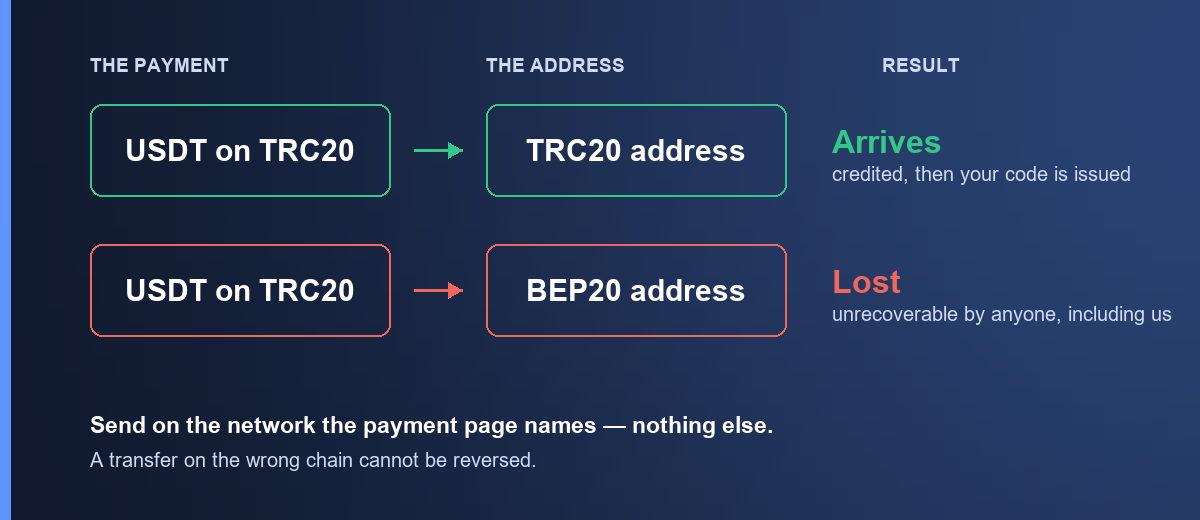
A coin like USDT does not live on one blockchain. The same USDT exists on several networks, and they are not interchangeable. Send USDT on one network to an address that expects another, and the funds land somewhere nobody can reach them — not you, not us, not the exchange you sent from.
So: match the network on the payment page exactly. The page names it. Your wallet or exchange will ask you to pick one when you withdraw. Those two must agree, character for character, before you press send.
The same care applies to the address itself. Copy and paste it; never retype it, and never trust a screenshot.
Networks also differ in what they cost you to send. On a small order the transfer fee can be a meaningful fraction of the purchase, which is worth a glance before you choose — a $5 card sent on an expensive network is not a $5 purchase any more. We take USDT on TRC20, ERC20 and BEP20; how the three compare on cost and speed is a short read, and paying with USDT step by step covers the gas-coin detail that stops more transfers than anything else.
What actually happens when you pay
- Pick a card and an amount. Every product page shows the exact price and, where it matters, the region the card is locked to. Check that before anything else — the rule differs by brand, and a wrong-region card is the one mistake we cannot undo for you.
- Sign in. Browsing is open; ordering needs an account, because your codes have to live somewhere you can get back to them.
- Confirm the order. You land on a payment page showing the exact crypto amount, the network, and the address to send it to.
- Send from your wallet or exchange. Match the network. Paste the address.
- Wait for the network to confirm. This is not us being slow — it is the blockchain agreeing the transaction happened.
- Your code appears in My orders and in your email. Usually within minutes of the confirmation.
That is the whole flow. There is a fuller walkthrough with screenshots on how it works.
The wait between sending and getting your code
Once you have sent, the order sits in a confirming state. How long depends on the network, not on us — a TRON or BNB transfer typically confirms in seconds, Bitcoin can take considerably longer when the network is busy.
Things worth knowing while you wait:
- Do not send again. A pending transaction is not a failed one. Sending twice means paying twice, and the second payment is a separate order.
- Closing the tab is fine. The order does not depend on the page staying open. The code lands in My orders and in your email either way.
- If it is taking unusually long, the transaction is almost always visible on a public block explorer using the transaction ID your wallet gave you. That tells you whether the network has it yet, which is the first thing our support will ask.
If something looks genuinely stuck, work through what to check when a payment hasn't confirmed — it is the order our own support checks things in — and then contact us with the order number and the transaction ID.
What we ask you for, and what we do not
Buying needs an email address and a password. That is the account your codes are delivered to and the only way to get them back if you lose the email.
We do not ask for a photo of your passport to buy a gift card. We are also not going to pretend the purchase is anonymous — it is not, and any shop that tells you otherwise is either confused or lying to you. You have an account; that account has an email on it. The full version, including where the limits actually are, is in do you need KYC to buy a gift card with crypto.
When crypto is the wrong way to buy this
Worth saying plainly, because it is not always the right call.
If you have a working card and a bank that does not ask questions, buying direct from Steam or Apple is usually cheaper. Resellers — us included — price above face on some products to cover sourcing and payment costs, and you can see exactly what that costs you on each product page.
Crypto makes sense when the card route is closed or expensive: your bank blocks international payments, PayPal is not available where you live, the platform stopped taking your currency, or your money is simply already in crypto and moving it out costs more than the margin here.
Buy the way that costs you least. Sometimes that is us and sometimes it is not.
Frequently asked questions
Which coin should I pay with?
Whichever you already hold. If you hold several and want the least friction, a stablecoin on a cheap network keeps both the price and the fee predictable.
What happens if I send the wrong amount?
Underpaying leaves the order short and it will not release a code; overpaying is not automatically refunded. Send the exact quoted amount, and if something has gone wrong, contact support with the transaction ID before ordering again.
What if I send on the wrong network?
Those funds are generally unrecoverable — by us, by you, or by the exchange. This is the one mistake worth double-checking every single time, and the reason the network is printed on the payment page rather than assumed.
How long does the code take?
Usually minutes after the network confirms your transaction. The confirmation is the slow part, and how slow depends entirely on which coin and network you chose.
Can I get a refund?
A code is non-refundable once it has been revealed — once you have seen it, we cannot un-sell it. If a code does not work, that is a different situation and we deal with it: start with what to do when a code is rejected, and the terms are in the refund policy.
Do I need a wallet, or can I send from an exchange?
Either works. An exchange withdrawal is a normal transaction as far as the payment page is concerned — just make sure the exchange lets you choose the network, and that you choose the right one.