Netflix does not accept cryptocurrency. If your money is in Bitcoin or USDT and you want a subscription without handing a card to a streaming service, the route is a gift card: buy it with crypto, redeem the code, and the balance pays your bill until it runs out.
There is one rule to get right, and almost every guide states it wrong.
The rule: currency, not country
You will read that Netflix gift cards are "US only". That is close enough to be misleading.
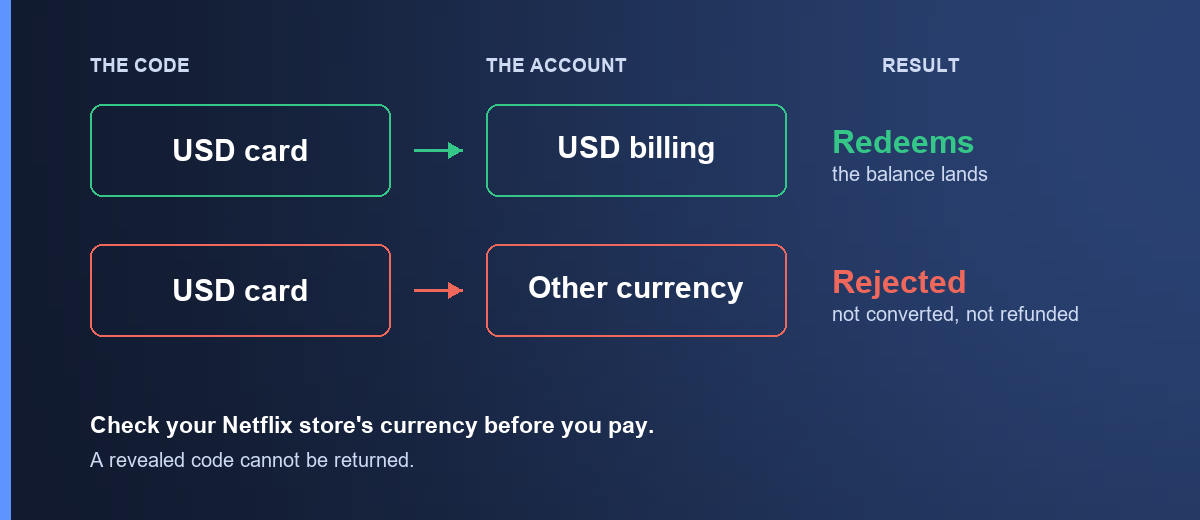
Netflix locks a gift card to the currency the card was issued in, and matches it against the currency your Netflix account is billed in. Those are not the same thing as your country.
The practical consequence: a US card works on an account billed in US dollars wherever you happen to live. If your Netflix account was set up with USD billing, the card redeems — you do not have to be in the United States. And an account inside the US billed in another currency would not take it.
This matters because it makes the check different. Do not ask "am I in the right country?" Ask "what currency does Netflix charge me in?"
How to check, before you pay
Sign in to Netflix, open Account, and look at your billing details or your last charge. The currency symbol on the amount is the answer. If it is $ and the account is billed in US dollars, a US card will redeem.
If you are not sure, check an old billing email. It states the currency explicitly.
What a Netflix card does when you redeem it
The balance sits on your account and pays your subscription automatically as it comes due. It is not a separate wallet you spend from — Netflix simply draws on it instead of charging your payment method, until it is used up.
Three consequences worth knowing:
It works for new and existing accounts. You can redeem one on a fresh signup or on an account you have had for years, and you can use it to move up a plan tier without adding a card.
It does not lock your plan. If you change plans, the balance keeps paying at the new rate — it just lasts a different number of months.
Netflix gift card balances do not expire. The card is good until you redeem it, and the balance is good until it is spent.
Amounts here run from about $52.02 to $156.06, which at typical plan prices is roughly a few months to about a year.
Buying it with crypto
- Open Netflix Gift Card US.
- Pick the amount.
- Sign in, confirm the order, and send the payment from your wallet. How paying works walks through the payment page in full.
The quote holds for a short window and the network you send on is final. Sending USDT on a chain other than the one shown puts the funds beyond anyone's reach — match the network on the payment page exactly. Stablecoins keep the price still while you send.
Once the transaction confirms on-chain, the code appears in My orders and a copy goes to your email. That is normally a few minutes.
How to redeem a Netflix code
- Go to netflix.com/redeem.
- Enter the code and select Redeem.
- Sign in to the account you want the balance on, or create one if you are new.
- The balance is applied and shown on your account page.
Make sure you are signed in to the right account before you confirm. A redeemed balance stays on that account and Netflix does not move it.
Copy and paste rather than typing.
When the code is refused
"This code isn't valid in your region" or a currency mismatch — your account is billed in a different currency from the card. Check your billing currency as above. The code is still good; it is good on a differently billed account.
"Already redeemed" — the code has been used. If you have not used it, send us your order number and we will check it against our supplier record.
"Invalid code" — almost always a typo. Paste rather than type, and check for a trailing space.
If none of those fit, email [email protected] with your order number and the exact message Netflix showed. The exact wording is what separates a currency problem from a supplier problem.
Frequently asked questions
Does Netflix accept Bitcoin directly?
No. Buying a gift card with crypto is the route.
Do I have to live in the United States to use a US card?
No. What matters is the currency your Netflix account is billed in, not where you are. An account billed in US dollars will take a US card.
Can I use it if I already have a subscription?
Yes. The balance is applied to your account and pays your bill as it comes due, instead of your card being charged.
Can I use it to upgrade my plan?
Yes. The balance pays at whatever your plan costs — a higher tier simply consumes it faster.
Does the balance expire?
No. The card is valid until redeemed, and the balance stays on the account until it is used.
Can I get the balance back as money?
No. It pays for Netflix and nothing else, and it cannot be refunded to a payment method or moved to another account.
Which cryptocurrencies can I pay with?
Bitcoin, Ethereum, USDT, USDC, BNB and TRON. Stablecoins are the easier choice since the quoted price does not drift while you are sending the payment.
What if my code does not work?
Email [email protected] with your order number and the exact error. If the code is confirmed faulty and has not been redeemed, we replace or refund it. See the refund policy for the full detail.
Ready? Netflix gift cards are here, or browse the full shop.